

What Readers Should Know
PANaHON includes an ATMO AI forecast option alongside weather observations and other map layers. Users should check the selected location and time.
Key Takeaways
- PANaHON includes an ATMO AI model.
- ECMWF is another available model option.
- Several weather variables can be displayed.
- Observations and forecasts serve different purposes.
- Check map settings before sharing information.
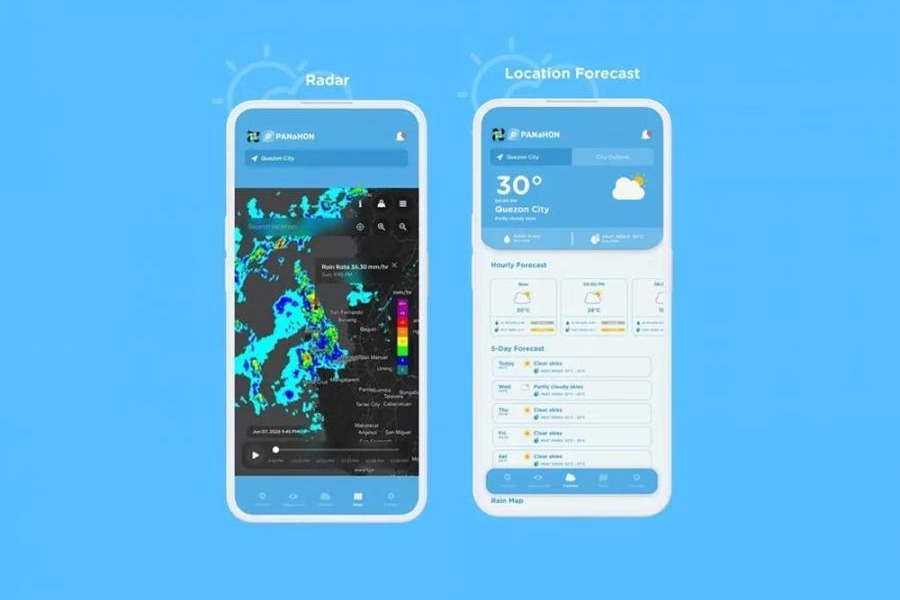
PAGASA’s PANaHON platform is bringing AI forecasting into a weather interface that also displays observations, radar information and warnings.
The official portal offers an ATMO AI model alongside ECMWF under its numerical weather prediction tools. Users can explore layers covering rainfall, wind, pressure, temperature, heat index and humidity.
November coverage describes the development as an AI-powered forecasting addition involving PAGASA, ASTI and Atmo. Technobaboy
For everyday users, the important step is to identify what the map is showing. A station observation records conditions at a particular time and place; a forecast layer presents modelled conditions for a selected period.
Check the location, timestamp and selected layer before sharing a screenshot or changing plans. When discussing a forecast, include those details so others can understand the information.
The platform offers more ways to explore weather data. Careful reading remains essential to using it well.
Frequently Asked Questions
Where can users access the portal?
At panahon.gov.ph.
Is an AI model available?
The portal lists ATMO AI.
What other model is shown?
ECMWF.
Which variables can users view?
Options include rainfall, wind, temperature and heat index.
What should accompany a shared map?
Its location, time and selected layer.


Gabriel
Introvert, wanderer, blogger, foodie, a hip-hop music writer, and one of the co-founders of a tech start-up company called GigsManila.
Related Articles
More by category, author, or tags
Alibaba Introduces Qwen4-Max for Work, Creative Production and Research
Add as a preferredsource on GoogleFind this story on GoogleAlibaba Introduces Qwen4-Max for Work, Creative Production and Researchgoogle.com · Opens in a...

Marcos Creates National AI Council and Adopts Governance Framework
Add as a preferredsource on GoogleFind this story on GoogleMarcos Creates National AI Council and Adopts Governance Frameworkgoogle.com · Opens in a...

Metrobank Launches Ask Earnest for Everyday Money Questions
Add as a preferredsource on GoogleFind this story on GoogleMetrobank Launches Ask Earnest for Everyday Money Questionsgoogle.com · Opens in a new...

Sophos Adds AI Service Controls and Coordinated Network Defense Tools
Add as a preferredsource on GoogleFind this story on GoogleSophos Adds AI Service Controls and Coordinated Network Defense Toolsgoogle.com · Opens in...

Alibaba Cloud Opens First Netherlands Region with Two Amsterdam Data Centers
Add as a preferredsource on GoogleFind this story on GoogleAlibaba Cloud Opens First Netherlands Region with Two Amsterdam Data Centersgoogle.com · Opens...

Netflix Tests AI Discover to Help Viewers Choose by Mood
Add as a preferredsource on GoogleFind this story on GoogleNetflix Tests AI Discover to Help Viewers Choose by Moodgoogle.com · Opens in...